
How to Use Stringfire Electric Guitar & Effect VST Plugin
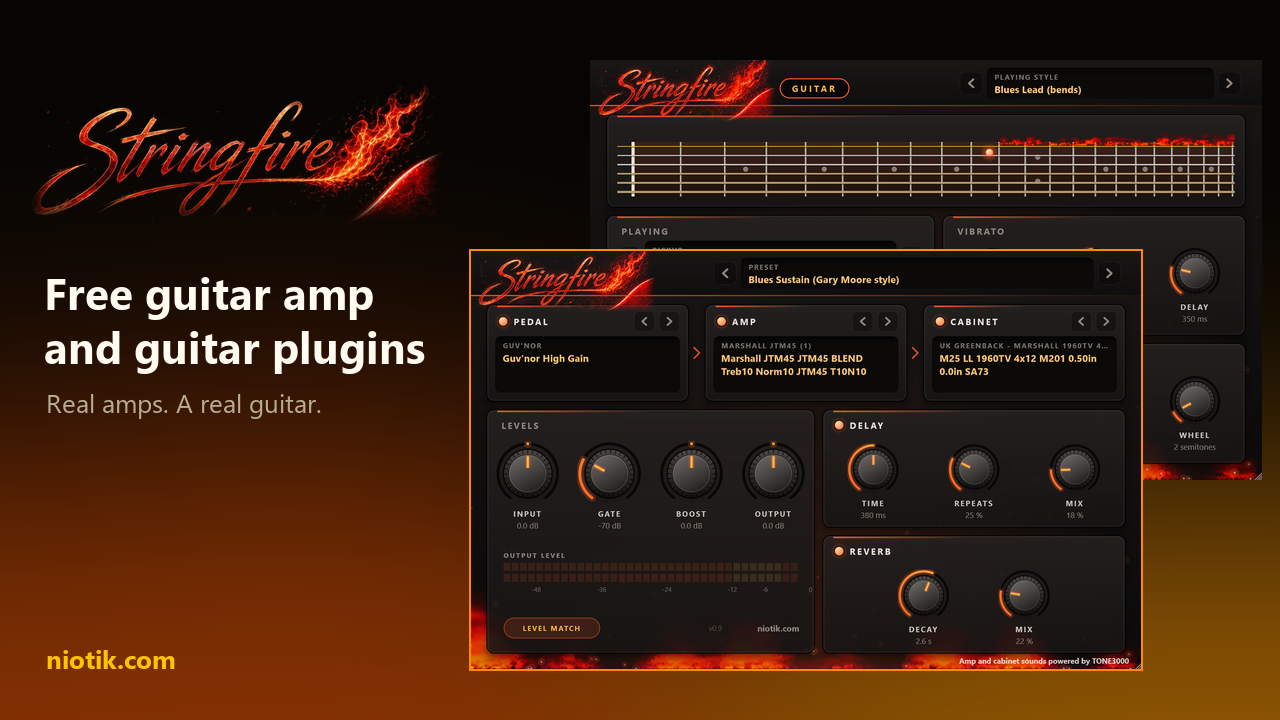
The plugins are called StringFire and StringFire Guitar. We made them at Niotik, and we are giving them away. This post shows what they are, how they work inside, what every knob does, and how to make a short song with them from an empty project.
You do not need to play guitar to follow along. If you know what notes and a few chords are, that is enough. Everything else is explained as we go.
Download StringFire for free (Windows, VST3. A Mac version is on the way.)
The two plugins in one minute
StringFire Guitar is an instrument. You give it notes, from a MIDI keyboard or by drawing them in your music program, and it plays them as an electric guitar. It is built from 690 recordings of a real guitar: every fret of every string. It bends strings, slides, adds vibrato and strums chords the way a guitarist does.
StringFire is an effect. It is everything a guitar is plugged into: a pedal, an amplifier, a speaker cabinet, and the echo and room sound added in a studio. It turns the thin sound of a bare electric guitar into the sound you know from records.
They are made for each other: StringFire Guitar is the guitar, StringFire is the rest. If you own a real electric guitar, you can also plug it into your computer and use StringFire alone.
Both are free. There is no trial period, no account and no paid version. We value music, and we want everyone to be able to use these tools to make something that inspires somebody else.
A few words you will meet
DAW: the program you make music in, such as FL Studio, Ableton Live, Reaper or Cubase. It stands for digital audio workstation.
Plugin: an extra instrument or effect that you load inside a DAW. StringFire uses the common VST3 format.
Instrument plugin: makes sound when it receives notes. StringFire Guitar is one.
Effect plugin: changes a sound that already exists. StringFire is one.
MIDI: notes written as instructions (which note, when, how long, how hard) instead of as recorded sound.
Piano roll: the screen in your DAW where you draw those notes. Higher on the screen is higher in pitch, and left to right is time.
Why an electric guitar needs so much equipment
An acoustic guitar is loud by itself. An electric guitar is not. Unplugged, it is quiet, and even plugged straight into a computer it sounds thin and a little lifeless. The sound you think of as "electric guitar" is made by the equipment after the guitar.
The guitar. Under the strings sit small magnets called pickups. They turn the movement of the strings into a weak electric signal. Musicians call this bare signal the dry signal. This is what StringFire Guitar produces.
The pedal. A small box on the floor between the guitar and the amplifier, switched on with a foot. There are many kinds. The ones in StringFire are overdrive, distortion and fuzz pedals. They make the signal rougher and thicker before it reaches the amplifier.
The amplifier, or amp. It makes the signal loud, but a guitar amp does much more than that: it colours the sound heavily. Turn it up and it starts to distort: the sound gets gritty, then crunchy, then a wall of roar. That distortion is not a fault. It is the sound of rock, blues and metal. Guitarists call the amount of it gain or drive. Low gain gives a clean sound, medium gain gives crunch, high gain gives a lead or metal sound.
The cabinet, or cab. The amplifier is connected to a wooden box with one or more loudspeakers in it. This box changes the sound far more than you would expect: without it a distorted amp sounds like a swarm of angry bees. In a studio a microphone stands in front of the cabinet, and where exactly it stands changes the sound again.
Delay and reverb. Delay is an echo: the sound repeats a moment later, getting quieter each time. Reverb is the sound of a room: the soft tail you hear after a clap in a hall. Both make a guitar sound bigger and further away.
How StringFire works inside
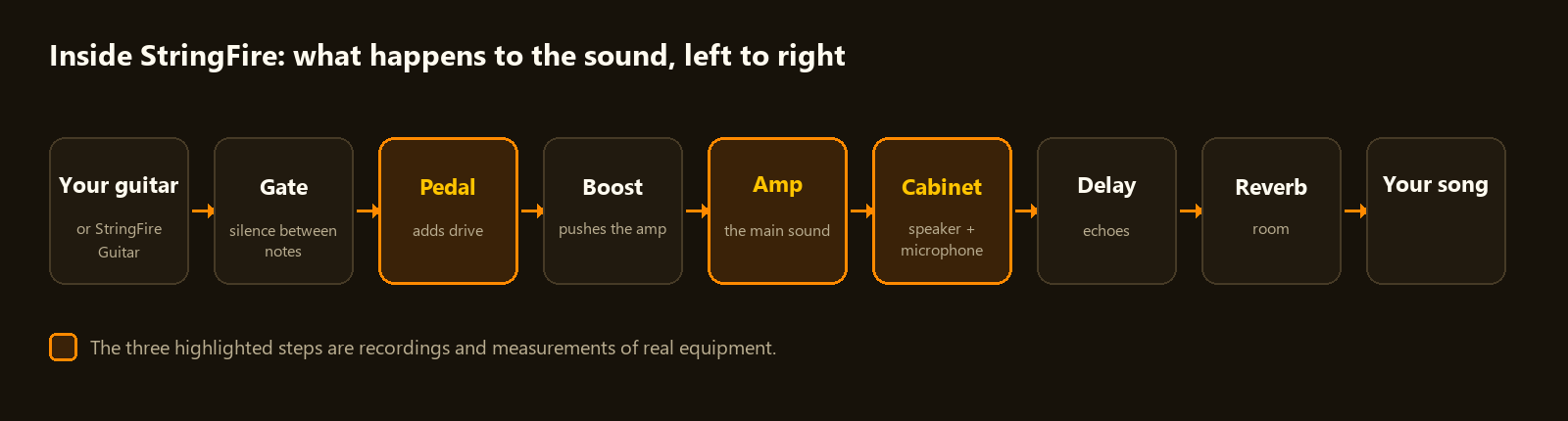
StringFire has one stage for each piece of that equipment, in the same order.
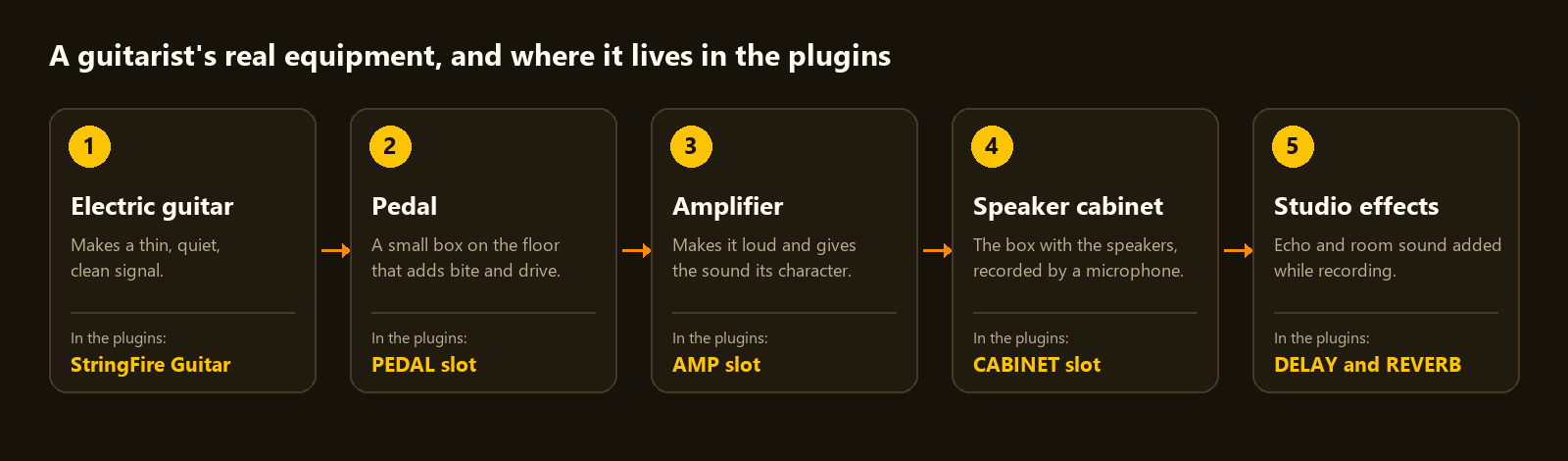
The interesting part is the three highlighted stages. Most amp plugins are built by programmers who study an amplifier and write code that tries to behave like it. StringFire does it differently: it uses captures.
What a capture is. Somebody takes a real amplifier, plays a long test sound through it and records what comes out. A computer then studies the two recordings, the sound going in and the sound coming out, until it has learned how that amplifier answers to anything. This learning is done by a small neural network, the same kind of technology behind modern AI. The result is one file that behaves like that one amplifier, at those settings of its knobs.
You can think of a capture as a photograph of an amplifier, except that this photograph answers when you play. Play softly and it stays clean. Dig in and it growls. That is exactly what the real amp did, because the capture learned it from the real amp. Pedals are captured the same way.
What an impulse response is. The cabinet is captured with a simpler trick. A very short click is played through the speaker and recorded by the microphone. That recording, called an impulse response (IR for short), holds the complete character of that cabinet, that microphone and that microphone position. StringFire applies it to the amp sound, and the amp sounds as if it is coming out of that cabinet.
So when you choose a rig in StringFire you are choosing a real pedal, a real amp and a real cabinet that somebody recorded. That is why it sounds real: at every important step, it is.
How StringFire Guitar works. Most guitar plugins record a handful of notes and stretch them across the keyboard, or build the sound with maths. StringFire Guitar has a separate recording for every fret of every string, on all five pickup settings: 690 recordings. It also keeps track of which string every note is on, like a player's hand does. That is what lets it bend one string, slide along it, or let six strings ring in a chord.
Getting set up
Download the installer from niotik.com/products/stringfire and run it.
At the end, let it open StringFire Library Setup and choose 1, Get everything. The sounds (the guitar recordings, the amp captures and the cabinets) are not inside the installer. This tool downloads them to your computer from the places their makers published them. It asks you to sign in to TONE3000 once. That is the community website where the amp captures and cabinets come from, and an account is free.
Open your DAW and let it look for new plugins. In FL Studio: Options, Manage plugins, Find installed plugins.
Now load them:
Add StringFire Guitar as an instrument. In FL Studio, click the + at the bottom of the Channel rack and pick it.
Send that instrument to its own mixer channel.
On that mixer channel, add StringFire as an effect.
Press a few keys or draw a few notes. You should hear a guitar through an amp. If you only hear a thin, clean pluck, StringFire is not in the path. If you hear nothing, the sound library is missing: open StringFire Library Setup from the Start menu.
StringFire, part by part
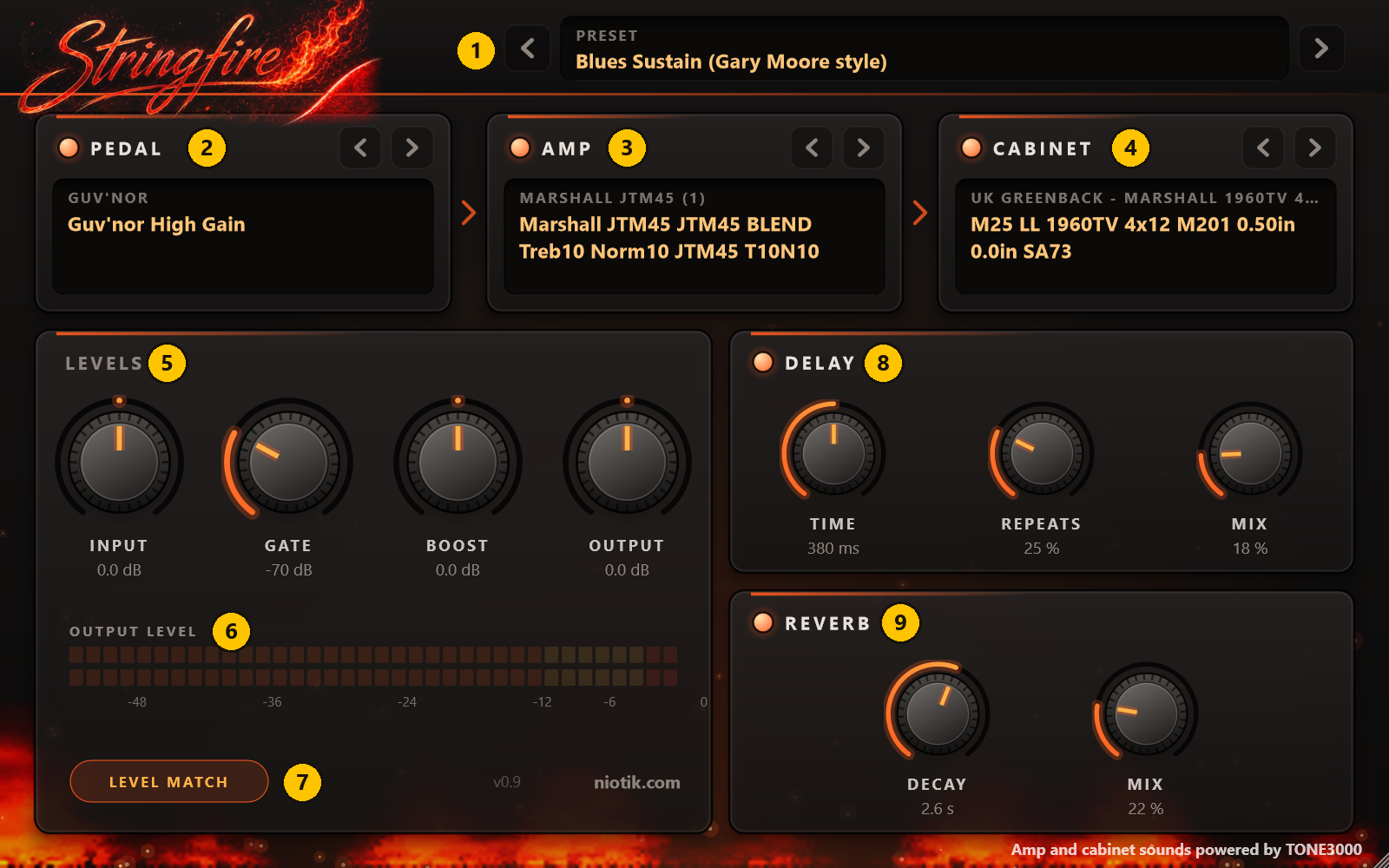
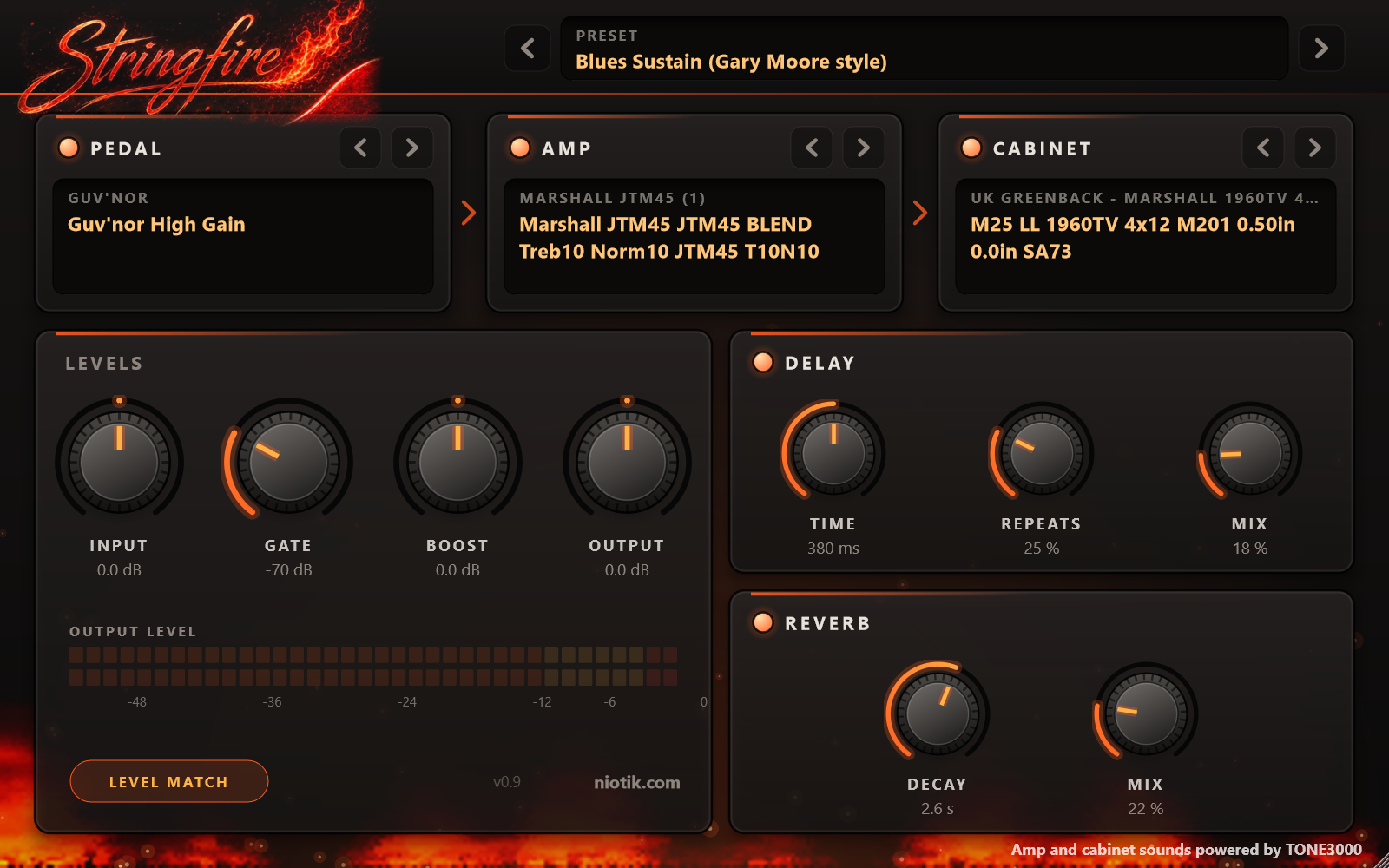
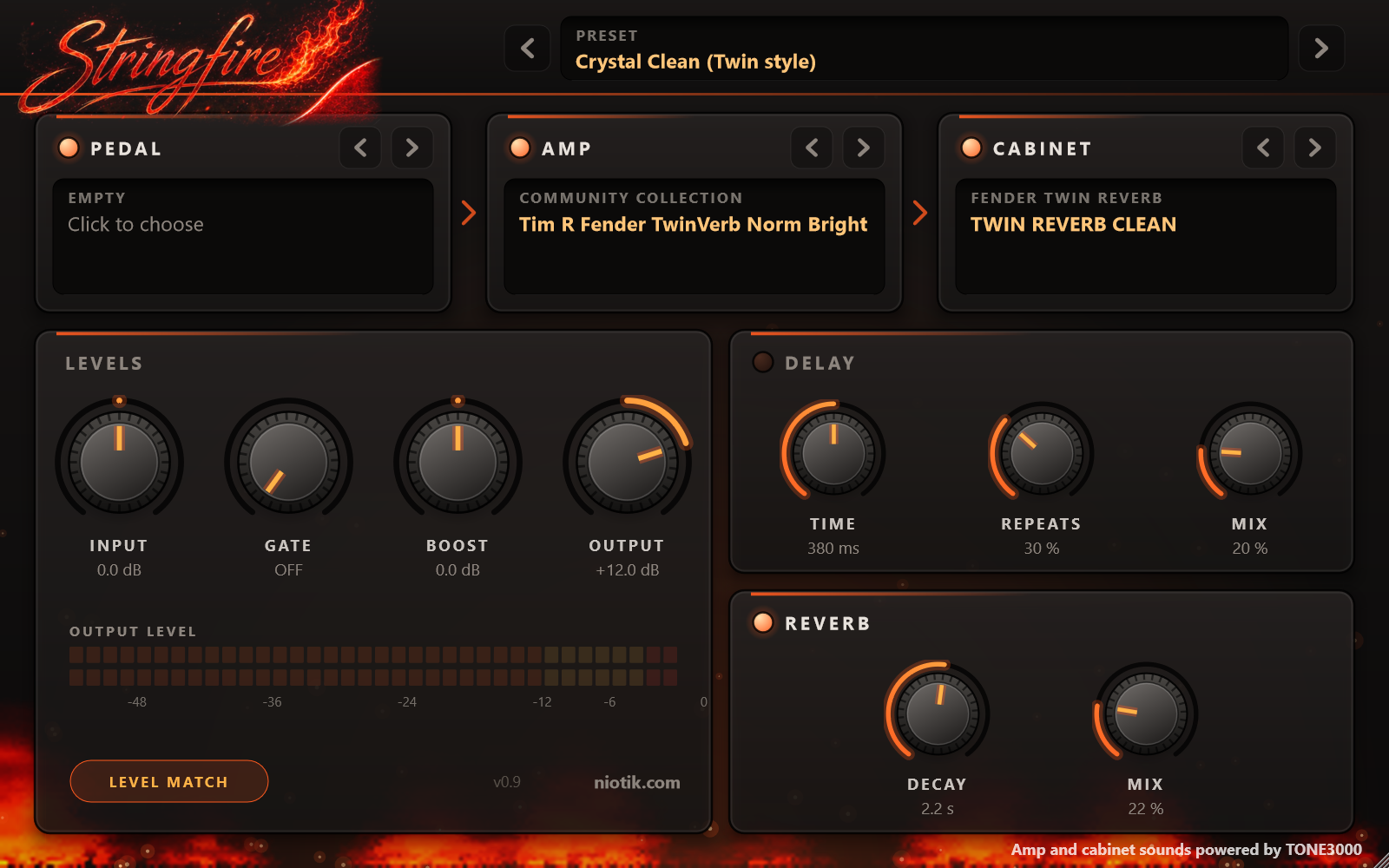
1. Preset. A preset is a complete rig: a pedal, an amp and a cabinet with all the knobs set. StringFire comes with 23, from glassy clean to very heavy. Click the name to see the list, or use the arrows to step through. The same menu saves your own presets and loads them again.
2. Pedal, 3. Amp, 4. Cabinet. The three captured pieces of equipment. Each box works the same way:
The glowing dot switches that stage on or off. Switch the pedal off and listen: that is the amp alone.
Click the name to choose a different one from your library.
The two arrows step to the next file in the same pack. In an amp pack these are usually the same amp with its knobs at different settings. In a cabinet pack they are different microphone positions.
5. Levels. Four knobs that control how loud the signal is at different points. Where you turn it up matters:
Input: how hard your guitar hits the pedal and the amp. More input does not just mean louder. It means more distortion, the same as playing harder or turning the guitar up.
Gate: a noise gate. High-gain amps hiss and hum when you are not playing. The gate closes the sound when it gets quiet. Turn it up until the noise between notes disappears. If your long notes get cut off, you went too far.
Boost: sits between the pedal and the amp. Turning it up pushes the amp harder, for more drive and more sustain (notes that ring longer).
Output: the final volume. It makes things louder or quieter without changing the tone.
6. Output level. A meter showing how loud the result is. If it sits at the far right all the time, turn Output down.
7. Level match. Captures come from many people and some are much louder than others. With Level match on, StringFire evens them out, so when you switch amps you compare the tone and not the loudness. Leave it on.
8. Delay. The echo. Switch it on with the dot.
Time: the gap between echoes. Short times (around 100 ms) thicken the sound, long ones (350 ms and more) give clear, separate echoes.
Repeats: how many echoes follow.
Mix: how loud the echoes are next to the guitar.
9. Reverb. The room.
Decay: how long the room rings. One second is a small room, four seconds is a cathedral.
Mix: how much of the room you hear. A little goes a long way.
Two more things. You can drag the corner of the window to make it bigger. And you can right-click a knob to let your DAW move it during the song.
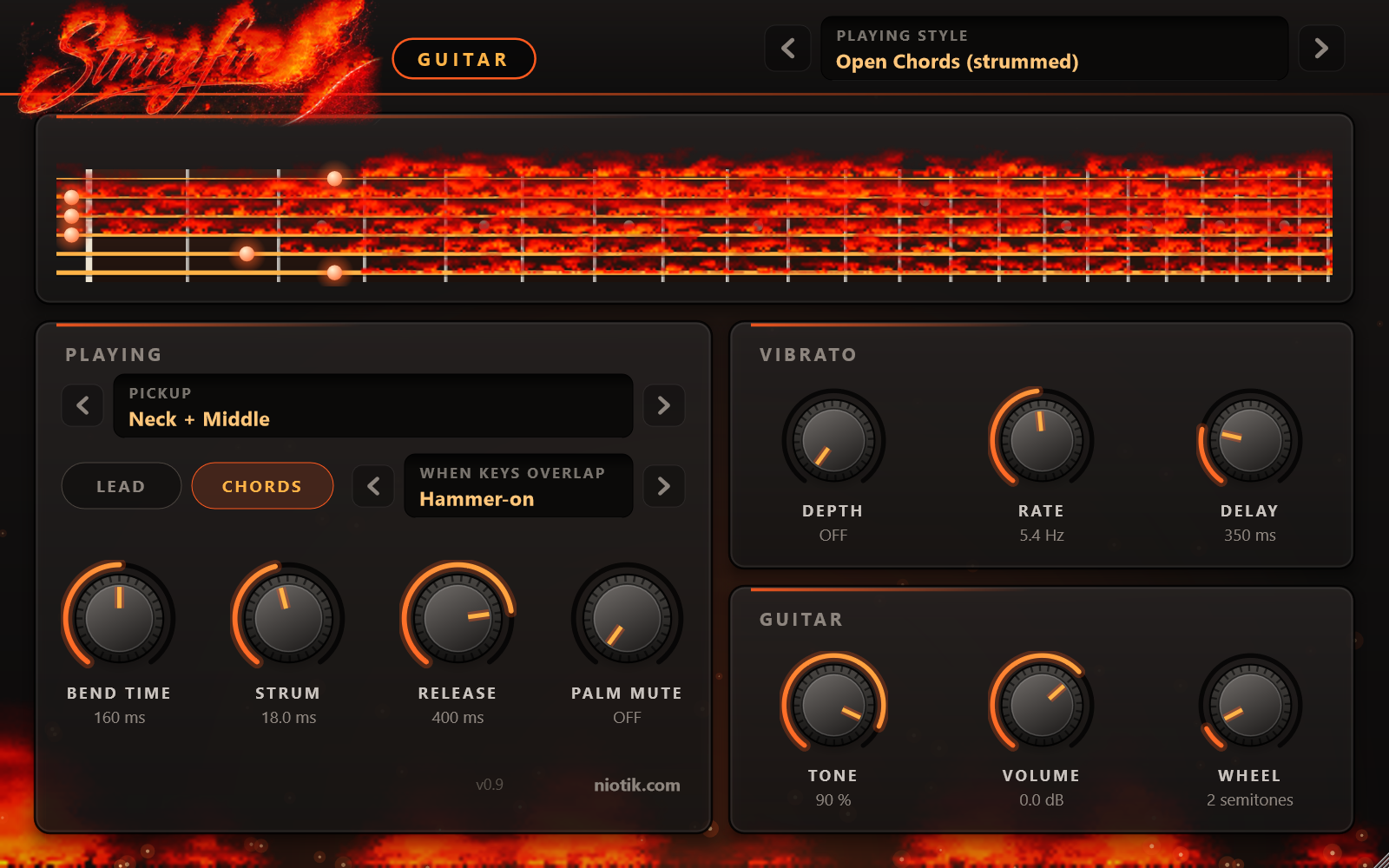
StringFire Guitar, part by part
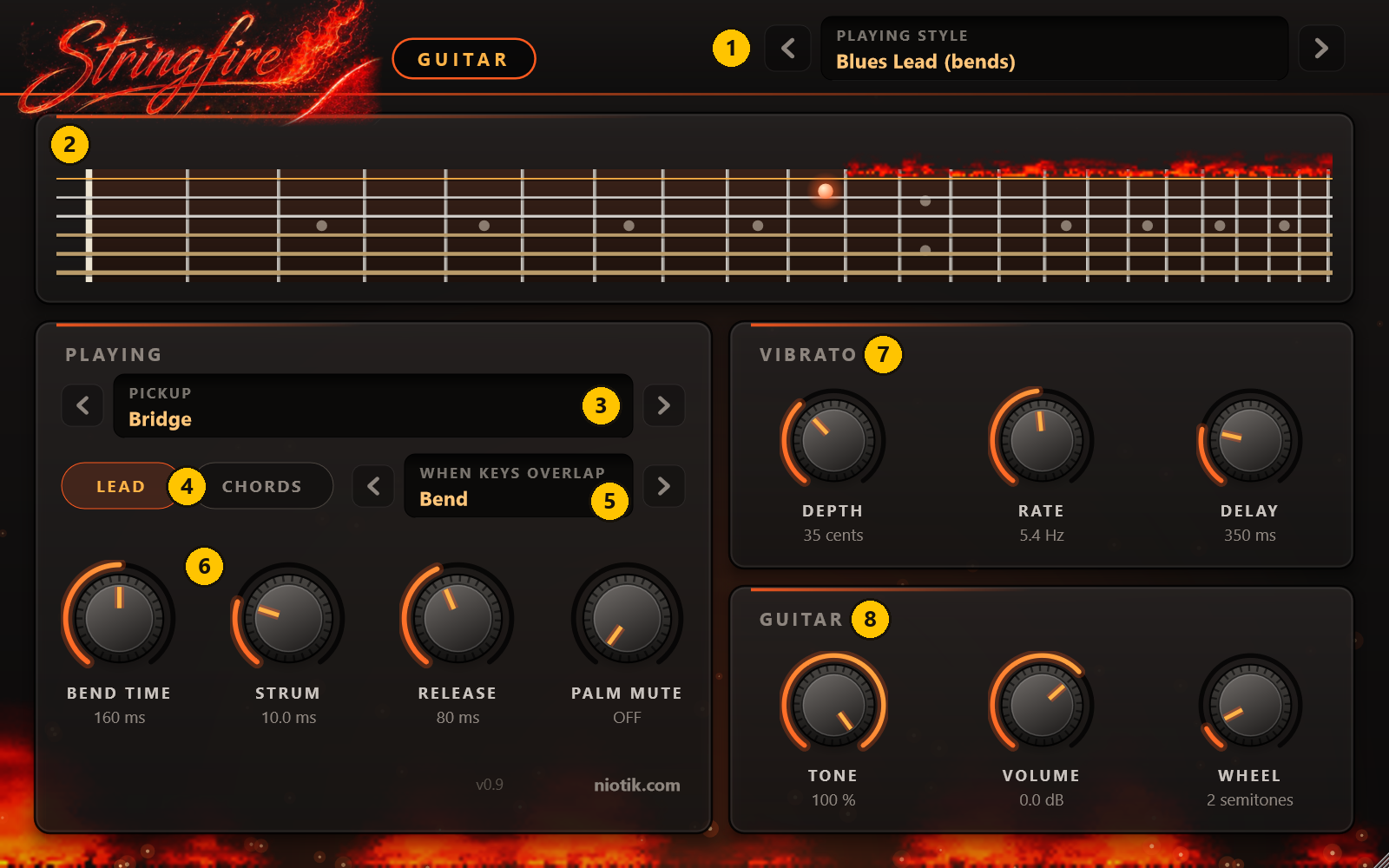
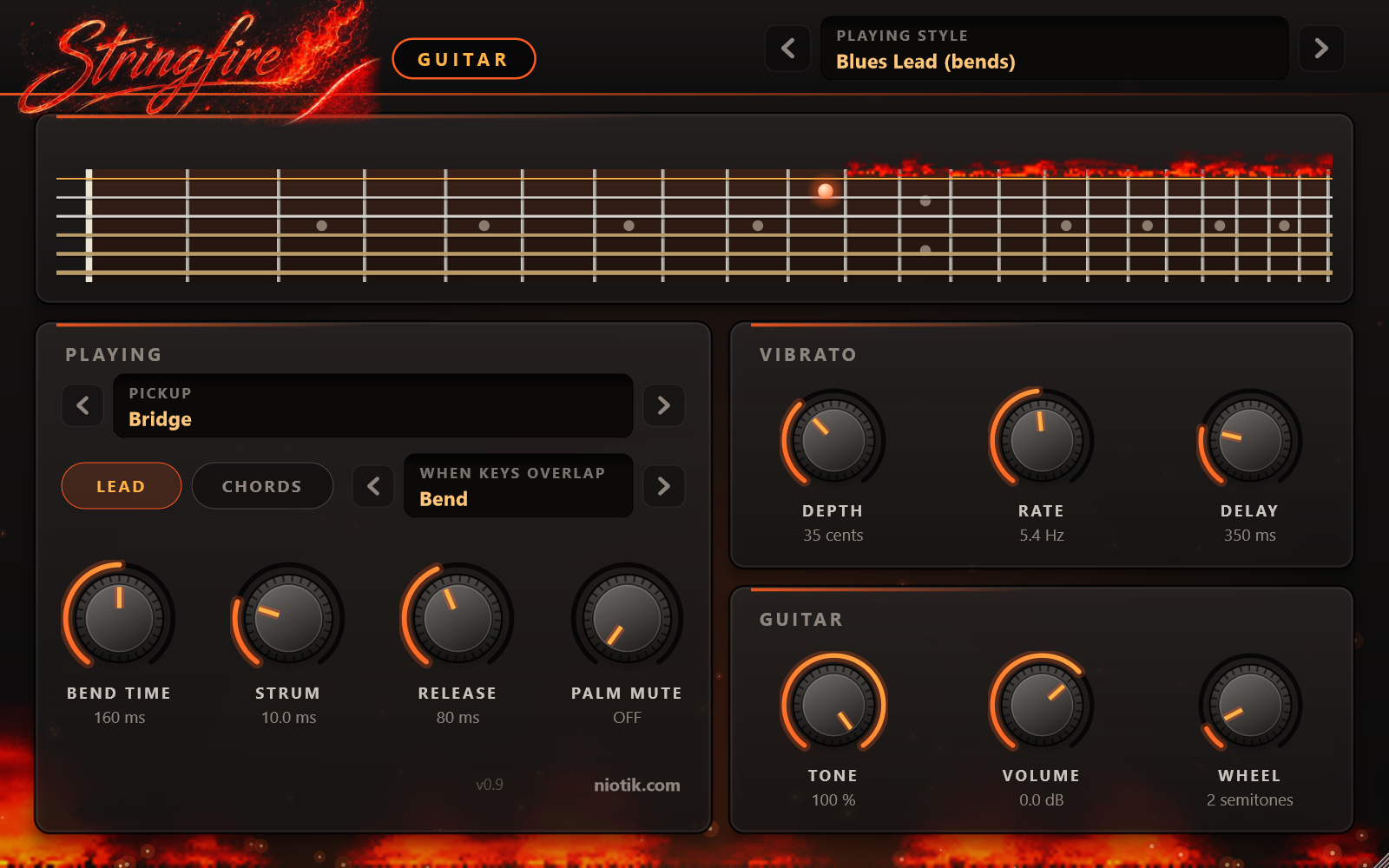
1. Playing style. A style sets every control at once for one way of playing: Blues Lead, Shred Legato, Slide Guitar, Power Chords, Funk Chords and so on, 16 in all. Start with a style and adjust from there.
2. The fretboard. A picture of the guitar neck, seen from above. The six lines are the strings, the vertical bars are the frets. A glowing dot shows which string and which fret each note is being played on. When a string is bent, you see it happen.
3. Pickup. A guitar has pickups in different places under the strings, and a switch to choose between them. Neck is warm and round, good for smooth solos and jazz. Bridge is bright and biting, good for rock and metal. The settings in between are thinner and glassier, good for clean chords and funk.
4. Lead or Chords. This is the most important switch.
Lead: one note at a time, for melodies and solos. If you press a new key while holding another, the plugin connects them like a guitarist would (see number 5).
Chords: many notes at once. Notes that start together are strummed across the strings instead of all sounding at exactly the same instant.
5. When keys overlap. In Lead mode, this decides what happens when a new note starts before the last one has ended.
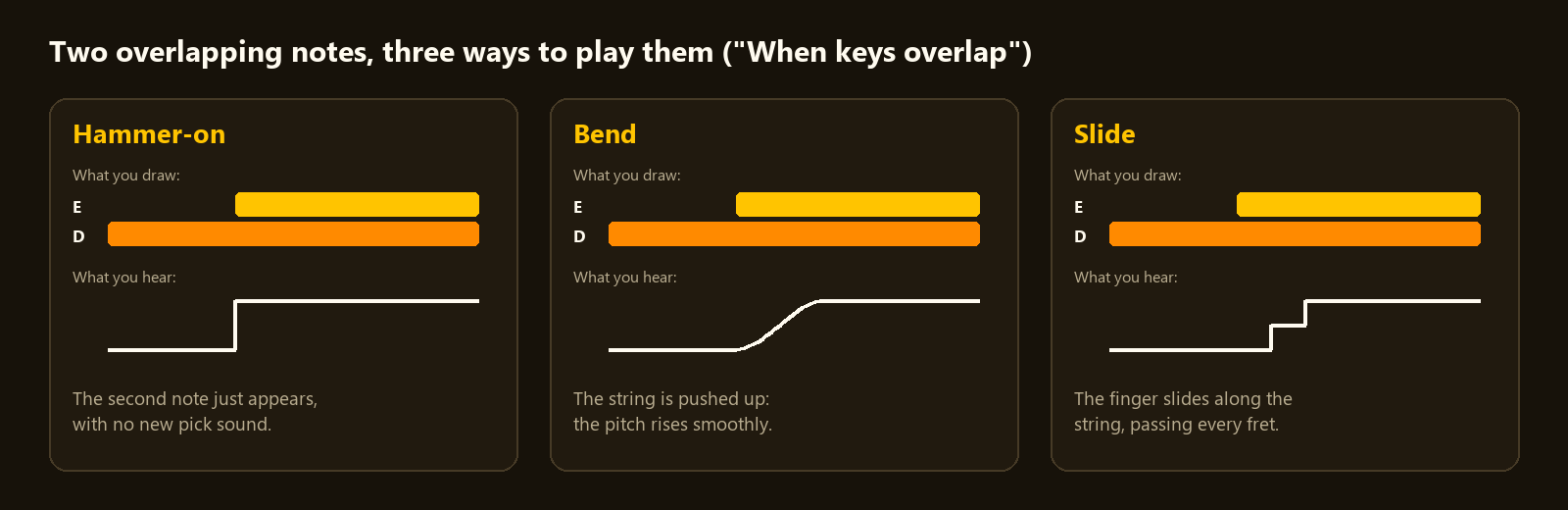
Hammer-on: the new note sounds on the same string without being picked again. Fast runs sound smooth this way.
Bend: the string is pushed sideways so the pitch rises smoothly into the new note. This is the crying sound of blues and rock solos. It works when the new note is up to three piano keys higher. Let go of the higher key while still holding the lower one and the string comes back down.
Slide: the finger slides along the string to the new note. It works up or down, up to five piano keys.
If the two notes do not overlap, each one is simply picked. So you decide, note by note, by how you draw them.
6. The playing knobs.
Bend time: how long a bend or slide takes to arrive. Short is snappy, long is slow and vocal.
Strum: in Chords mode, the tiny gap between one string and the next. Small is a tight, hard strum. Large is a slow sweep where you hear each string.
Release: how long a note keeps ringing after you let go of the key.
Palm mute: guitarists rest the side of their hand on the strings to make notes short and thumpy. That chugging sound of rock and metal rhythm is a palm mute.
7. Vibrato. Vibrato is a small, regular wobble in pitch that makes long notes sing. Depth is how wide the wobble is, Rate is how fast, and Delay is how long the note is held straight before the wobble begins. Good players start a note straight and add vibrato late, and that is what Delay does.
8. Guitar.
Tone: the tone knob on the guitar. Turn it down for a darker, softer sound.
Volume: the volume knob on the guitar. This is a secret weapon: turning it down makes the amp distort less, so the sound gets cleaner, not just quieter.
Wheel: how far the pitch wheel of your keyboard bends a note.
If you play from a keyboard: pressing harder picks the string harder, the modulation wheel adds vibrato, and the sustain pedal holds notes. The guitar's range is the range of a real one: from a low E (E2) up to a high D (D6), a little under four octaves. Notes outside it are moved into range.
Finding new sounds
Start from a preset that is close. It is much easier to adjust than to build from nothing.
Then try these, one at a time, and listen to what each does:
Cleaner: switch the pedal off, turn Input down, or turn the guitar's Volume down.
Heavier: switch the pedal on, turn Boost up, choose the Bridge pickup. Raise the Gate if it gets noisy.
A different flavour of the same sound: change only the cabinet, or step through its microphone positions with the arrows. This is the biggest change for the least work.
Mix and match: take the amp from one rig and the cabinet from another. Nothing can break.
Bigger: switch on Delay and Reverb, with both Mix knobs low.
A solo that sings: the Blues Sustain rig, Neck pickup, the Blues Lead playing style, and a little delay.
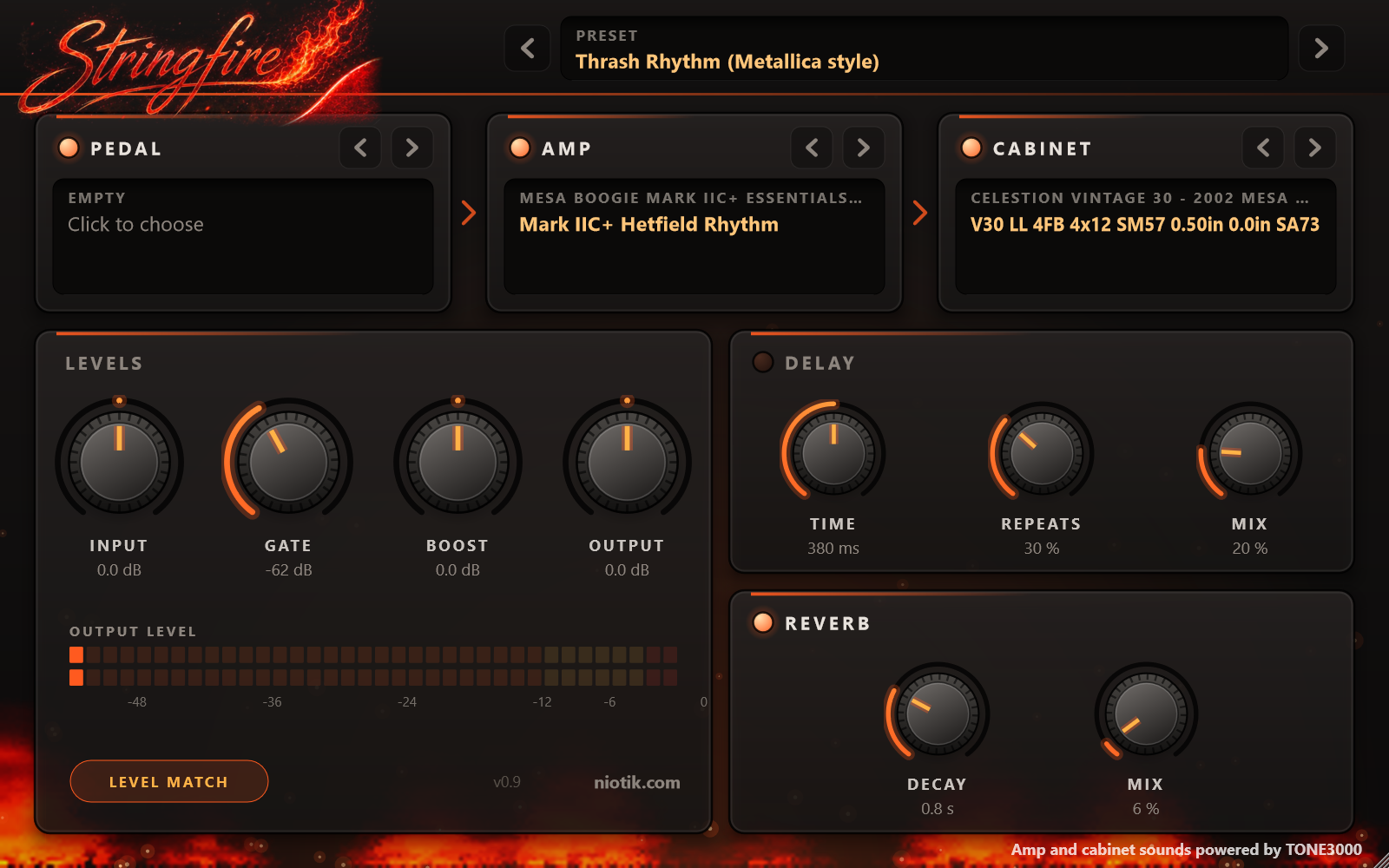
Tight heavy rhythm: the Thrash Rhythm rig, the Metal Chug playing style, and no reverb at all.
When you like what you hear, click the preset name and choose Save preset as. It is stored as a small file that you can load in any project, back up, or send to a friend.
Downloading more. The amps and cabinets in StringFire come from TONE3000, a community where people share captures of their own equipment. There are thousands, and they are free to download with an account.
On tone3000.com, find an amp, pedal or cabinet you like and download it. You get a zip file.
Put the zip in a folder of its own, open StringFire Library Setup, choose 5 (import every zip from a folder) and give it that folder. It unpacks the zip into the right place: amp and pedal captures (files ending in .nam) go to Documents\StringFire\amps, cabinets (files ending in .wav) go to Documents\StringFire\cabs.
In StringFire, click an amp or cabinet name and choose Rescan library. Your new pack is in the list.
One tip: some captures on TONE3000 are a "full rig", meaning the amp and its cabinet were captured together. With one of those, switch StringFire's Cabinet off, or you will hear two cabinets on top of each other.
Each pack belongs to the person who made it and comes with their licence, so check it if you plan to share the pack itself. The music you make with it is yours.
Playing nicely with other instruments
A guitar that sounds great alone can disappear, or cover everything else, once the rest of the song is there. A few simple rules solve most of it.
Everybody uses the same set of notes. A song is in a key, which is a family of notes that sound right together. Our example below is in A minor, and that is the easiest key there is: it is only the white keys of the piano.
The bass plays the name of the chord. When the guitar plays an A minor chord, the bass plays an A. When the chord is F, the bass plays an F. That note is called the root. If you do only this, your bass line already works.
Give each instrument its own floor of the building. Bass at the bottom, chords in the middle, melody on top. If two instruments play in the same range they fight. Move one of them an octave up or down and both become clear.
Land the melody on chord notes. A melody can wander around the key, but on the strong beats it sounds best on a note that is in the chord being played at that moment:
A minor: A, C, E
F: F, A, C
C: C, E, G
G: G, B, D
Heavy sounds want simple chords. Distortion adds a lot of extra sound to every note. A full six-string chord through a heavy amp turns to mud. That is why rock and metal guitarists play power chords: just the root and the note seven piano keys above it (A and E, for example). With clean sounds, play full chords. With heavy sounds, play power chords.
Leave room. If a piano is already playing the chords, the guitar does not need to play them too. Let it play short stabs, single notes, or nothing for a few bars. Silence is part of the arrangement.
Spread things left and right. Two guitars sound huge when one is turned to the left speaker and the other to the right. Keep the bass, the kick drum and the main melody in the middle.
A harmony line. For the classic twin-guitar sound, copy your melody to a second lead guitar and move every note two steps higher within the key (in A minor: two white keys up). Some notes will end up three piano keys higher and some four. That is correct.
Let's make a short song
Here is a complete small song: 17 bars, about 45 seconds, four instruments. It uses only white keys.
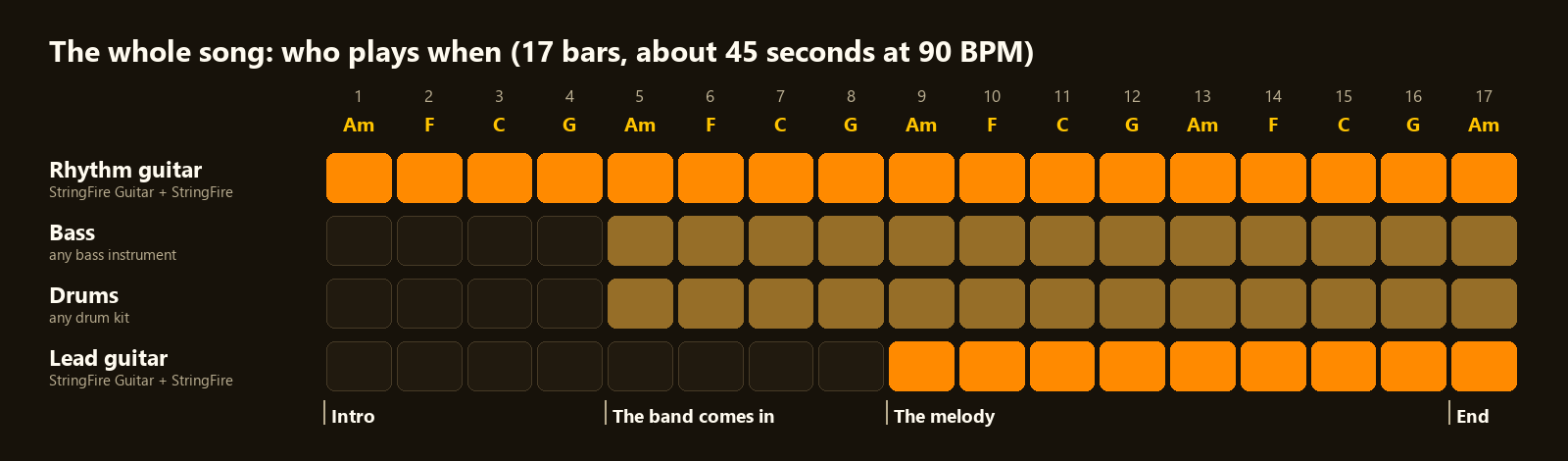
You can draw every note yourself by following the steps, or download the MIDI files at the end of this post and drag them in.
Step 1: tempo and key. Set the tempo of your project to 90 BPM (beats per minute). The key is A minor: white keys only.
Step 2: the chords. The whole song repeats four chords, one bar each: A minor, F, C, G. This is one of the most used chord sequences in popular music, and it never gets old.
Step 3: the rhythm guitar.
Add StringFire Guitar. Choose the playing style Open Chords (strummed).
On its mixer channel add StringFire with the rig Edge of Breakup (Stones style). It is mostly clean with a little grit.
Draw the chords in the piano roll. In each bar, play the chord four times: a long one on beat 1, a short one just before beat 3, then one on beat 3 and one on beat 4.
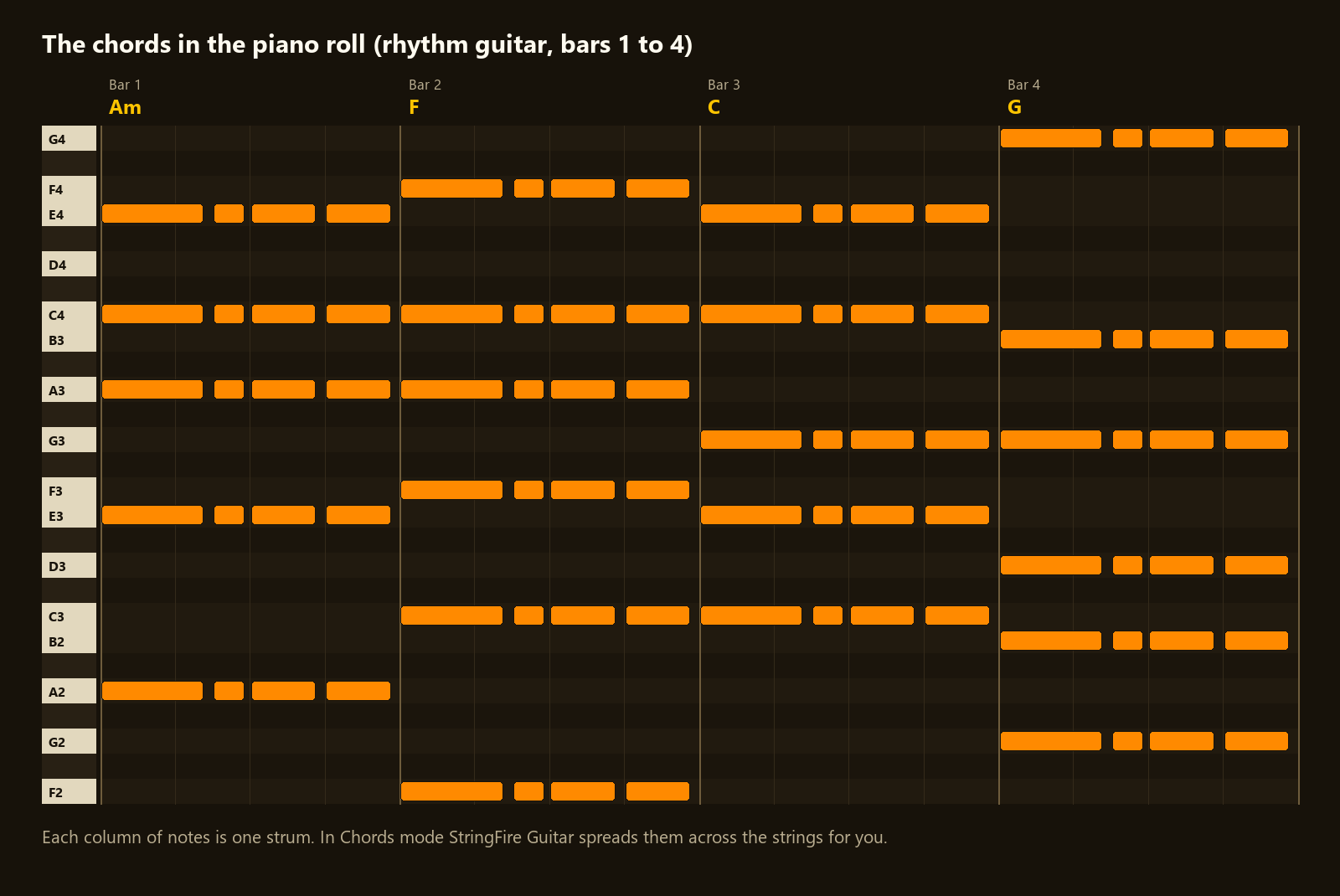
The notes of each chord, from low to high:
A minor: A2, E3, A3, C4, E4
F: F2, C3, F3, A3, C4, F4
C: C3, E3, G3, C4, E4
G: G2, B2, D3, G3, B3, G4
(Different programs number octaves differently. If it sounds one octave too high or too low, move everything by twelve keys.)
Six notes at once are loud. If the chords sound too rough, turn the guitar's Volume knob down a little.
Play it. You should already have something that sounds like the start of a song. Let this play alone for the first four bars: that is your intro.
Step 4: the bass. Add any bass instrument your DAW has. From bar 5 on, play the root of each chord, low: A, F, C, G. One long note on beat 1 and another on beat 3 is enough.
Step 5: the drums. Add any drum kit. From bar 5 on, use the most common beat there is:
Kick drum (the low thump) on beats 1 and 3
Snare drum (the crack) on beats 2 and 4
Hi-hat (the tick) eight times per bar, evenly
Step 6: the lead guitar. This is where it comes alive.
Add a second StringFire Guitar. Choose the playing style Blues Lead (bends).
Give it its own mixer channel with its own StringFire, rig Blues Sustain (Gary Moore style).
From bar 9 on, draw a melody using only these five notes: A, C, D, E, G.
Those five notes are called the A minor pentatonic scale. Guitarists love it for a simple reason: over these chords, it is very hard to play a wrong note with it.
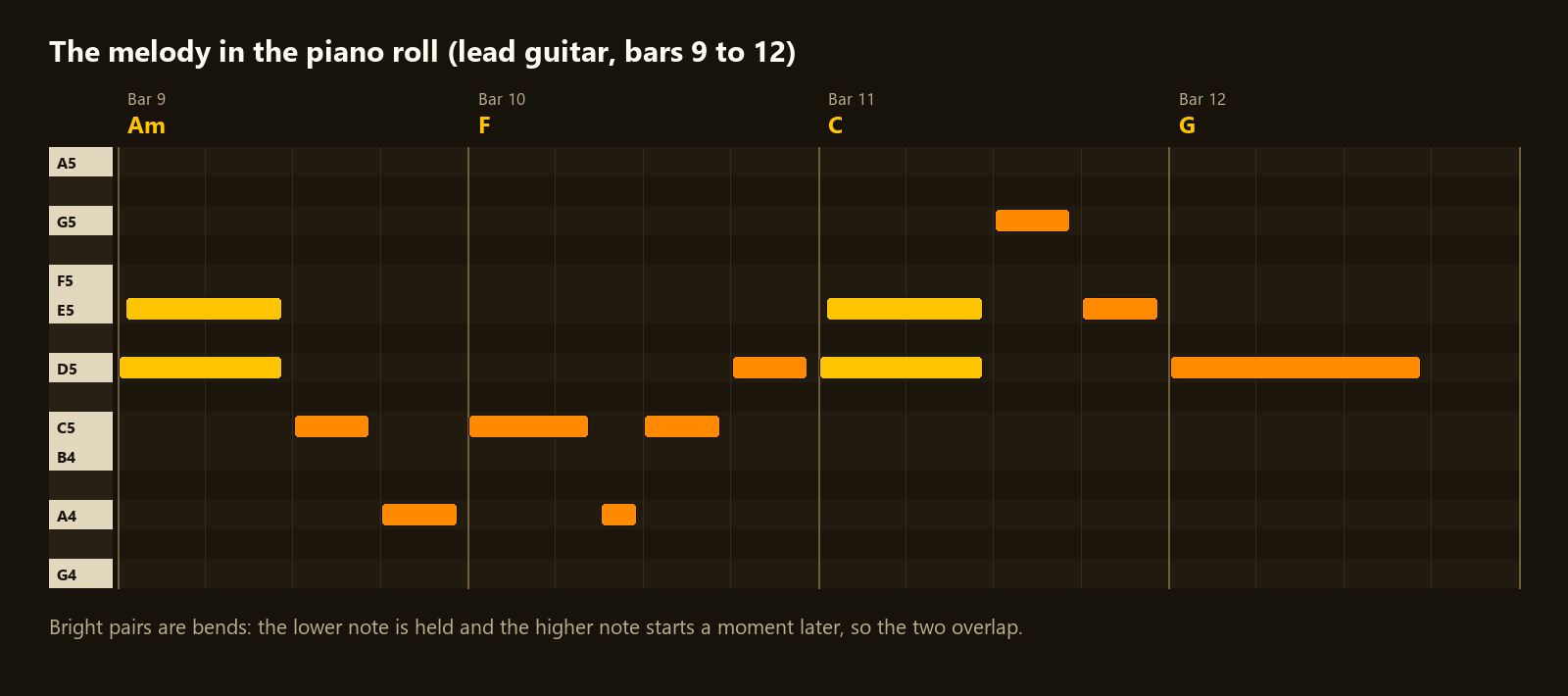
Look at the bright pairs of notes in the picture. Those are bends. To make one, draw a D, then draw an E that starts a moment later, so the two overlap. StringFire Guitar plays the D and pushes the string up to E. Do this on the long notes and your melody stops sounding like a keyboard and starts sounding like a guitar.
Hold the long notes and listen: after a moment the vibrato comes in by itself.
Step 7: the ending. In bar 17, everyone plays one last A minor and lets it ring. The melody ends on a long A.
Step 8: balance. Listen to the whole thing and set the volumes:
Drums and bass are the floor. Set them first.
Bring the rhythm guitar up until you can hear the chords clearly, and no further.
The lead guitar goes on top, a little louder than the rhythm guitar.
Turn the rhythm guitar slightly to the left to make room in the middle for the lead.
Give the lead a little Delay (Mix around 20%) and a little Reverb. Keep the rhythm guitar drier.
Then export it. You have a song.
Make it yours. Change the last note of a phrase. Swap the rig on the rhythm guitar for Crystal Clean, or for Classic Rock Crunch with power chords. Move the lead to the Neck pickup. Double the tempo. Every one of these gives you a different song from the same 17 bars.
Download
StringFire and StringFire Guitar: free, for Windows (VST3). macOS is coming.
If you make something with StringFire, we would love to hear it. Tell us.
Amp and cabinet sounds powered by TONE3000. Amplifier, pedal and artist names describe the equipment that was captured and the style a preset aims at. StringFire is not affiliated with or endorsed by any of them.
Have something in mind?
Tell us what you want to build. We will reply with an honest view of scope, time and cost. The first evaluation is free.
Get a free evaluation